

PIC microcontrollers are widely used on industry and academia. According to Microchip, the manufacturer of the PIC microcontroller, it took them nine years to ship their four billionth unit, but only one year to ship a million more. This gives a good idea of how widespread the use of this microcontroller is and how popular it has become.
In Mexico alone, more than 90% of the microcontroller-oriented classes in colleges and universities use the PIC microcontroller as teaching platform. The ease of use, very low pricing and extensive programming platforms, that go from free (in assembly language) to reasonably priced (in C, Pascal and Basic) have made the PIC a popular chip.
Nevertheless, most of the programming devices (called programmers in PIC jargon) as well as the programing environments, only work in Windows, leaving us Mac users out-played by or Windows colleagues. Even though there exist several compiler options (gputils, CCS) and at least one IDE (PICC lite) for Mac OS X. The availability of programmers (device programmers) that are out-of-the-box compatible with Mac OS X is inexistent. Needless to say that overall solutions that include the IDE for a high level language (C, Pascal or Basic) with the programmer are also absent in Mac OS X.
With the introduction of Mac OS X on Intel based processors and the release of Parallels a new hope was given to us who for some reason or other prefer the PIC among many other microcontrollers in the market. Unfortunately, as you will find out by reading the rest of this article, the situation has not improved to a point that one can finally get rid of that old Windows machine.
Parallels and the PIC
Installing Parallels and have a Windows virtual machine running is a breeze and it is as easy as installing it on any PC. Parallels’ website offer step by step guides on how to install and be up and running in no time.
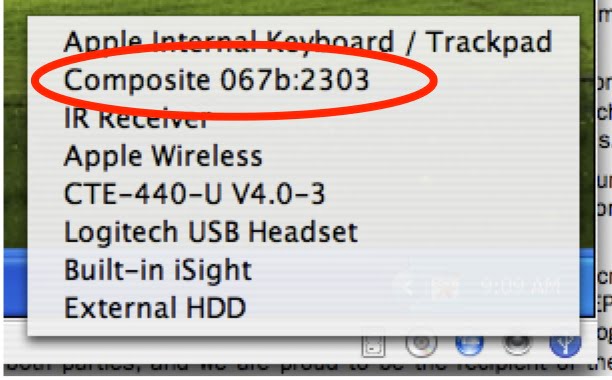
Figure 1
Serial Port on the Virtual Machine
Once the Windows virtual machine was installed then the first thing to verify with the task at hand was wether one would be able to read the output of a serial device such as a GPS or Inertial Measurement Units (IMUs). For that, a USB to RS232 converter was used. This devices are very popular among hobbyists and professionals who need to access an RS232 device using modern laptops or PCs that do not have serial ports. They can be bought at Fry’s, Digikey, TigerDirect and the like.
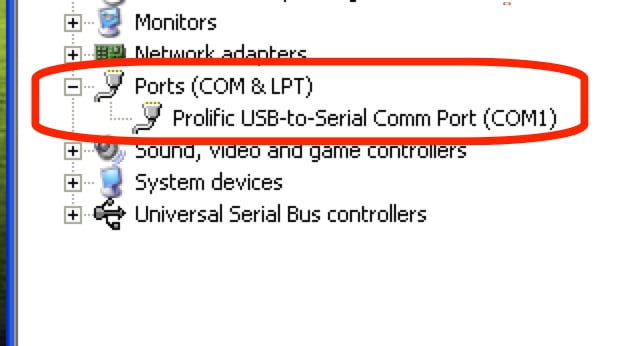
Figure 2
As soon as the USB connector was plugged to the Mac it appeared on the USB devices available to Parallels. Selecting it from the list immediately made it available to the Windows virtual machine and from there on installing it was identical to the installation in a regular Windows machine. When the installation was done, The Device Manager in Windows showed the serial port without any apparent problems.
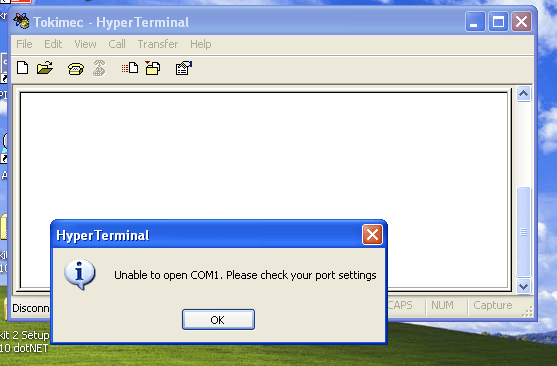
Figure 3
The next step was to get the serial message from a Tokimec IMU to the Mac. For that, Hyperterminal, the serial terminal program included in Windows XP was used. Unfortunately Hyperterminal was not able to use the available serial port. Nevertheless not all was lost, trying several serial terminal programs the one that made the job was USART Terminal by MikroElektronika.
So once that the serial communication was working the next step was to try out the programming environments. Three different programming environments were installed without any significant problem: Microchip’s MPLAB IDE and C30 programming language, MikroPascal and MikroPascal for dsPICs.
Up to now everything seemed to go reasonably well so now it was time to get the Programmers to work.
PIC Device Programmers
Device programmers in the PIC environment are as diverse as PIC models themselves. There are probably about 30 to 40 different programmers out there, from very simple do-it-yourself type to the very professional industry-quality programmers. For this review four programmers were tested: the JDM programmer which is a very simple but powerful serial programmer, the GTP USB which used to be a free USB programming device (now the author sells the firmware for a reasonable price), the PICkit 2 entry-level programmer manufactured by Microchip and finally the EasydsPIC which is a full-blown development board for dsPICs which are powerful cousins of the traditional PICs. It is important to note that all of these programmers where successfully tested and extensively used in a Windows machine previous to this test drive.
JDM Programmer
As previously mentioned, the JDM programmer is a very powerful serial programmer and it is very popular, specially among hobbyists, due to the fact that it uses easy to find parts and is capable of programming a wide variety of PICs. For this test a PIC16F84A microcontroller was used for the test. On the software side WinPIC800, which is a freeware, was the tool used. After configuring the device,
WinPIC800 was unable to recognize the JDM programmer trough Parallels.


Figure 5
GTP USB Programmer
This programmer is possibly one of the most powerful entry-level programmers out there. It programs a very wide variety of PICs, dsPICs, EEPROMs and ATMEL AVR microcontrollers. It’s USB powered, ICSP compatible and matches very nice with the WinPIC800 software. It is probably not as popular as it should be because it is a harder than the JDM to assemble and needs a preprogrammed PIC18F2550 to handle the USB communication and programming. The programmer’s firmware used to be free but about mid 2006 the owner of the firmware decided to start selling it and its successive updates.

Figure 7
As soon as the USB cable was connected to the Mac, Parallels made it available to the Windows Virtual Machine. Once the drivers were installed it appeared in the Windows Device Manager without a problem. Once again WinPIC800 was used as software for flash programming but it also failed to recognize the hardware.

Stay connected