

ChemDoodle 3.0 from iChemLabs is the latest update of a chemical drawing package that also provides for support for many other types of chemical data such as tlc plates, spectra, and molecular properties. It is a java application and is available for Mac OS X 10.5 and higher, Linux and Windows. On a Mac installation is trivial, simply drag the ChemDoodle folder into the Applications folder. When you first start ChemDoodle you are prompted for a license code, but it can be used for a 30 day trial with some limitations. The current price is $59.95 which is a fraction of the price of some of the competitors, and there are site licenses available. The ChemDoodle folder contains the application, a couple of resources and a 154 page user manual, and a useful keyboard shortcut guide.
Simply double-clicking on the application icon starts up the application and the user is presented with a user interface containing all the ChemDoodle components.

This display does tend to take over the whole desktop rather than use floating menu toolbars, but you can move the toolbars and widgets around to reduce the amount of real estate used, however I found that they popped back to the default positions when I resized the window. Whilst there some advantages in having all the options visible I wonder if it might be better to have some of the options available via dropdown selections. I’m not sure I need to be able to see every bond option. The main window is the drawing board and structures can be built using either the ready made templates or point and click construction one bond at a time. By default all new atoms are carbon but the atom types can be edited using the keyboard, one nice feature is that pressing a selected letter cycles through a list of atom types, for example clicking “C” cycles through [C, Cl, Ca, Cr, Co, Cu, Cd, Cs, Ce, Cm, Cf], whilst “B” cycles through [Be, B, Br, Ba, Bi, Bk, Bh]. There are a number of other valuable short-cuts, e.g. hovering over an atom and pressing “3” adds a three carbon chain. Structures can also be rapidly built using the templates available by clicking the green “Template” widget. You can add/remove hydrogens to selected atoms from the Structure menu, by default this adds hydrogens to all atoms, you can change this behaviour in the preferences but it might be useful to have an option to add hydrogens to heteroatoms only.
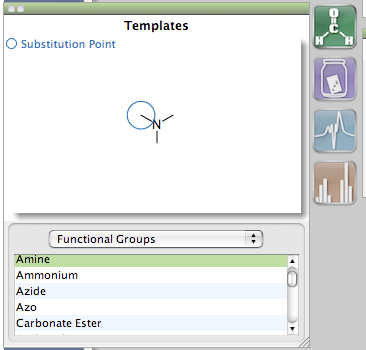
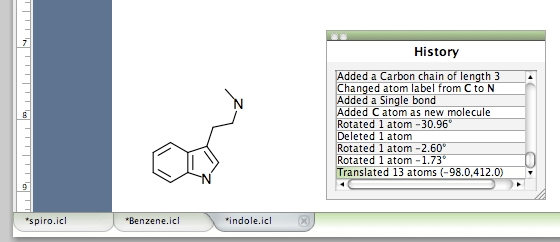
Whilst the application does occupy much of the desktop one nice space saving feature is the use of tabs for each document, this means you can have multiple documents open and switch between them by simply clicking on a tab all within a single window. Whilst “Apple Z” serves as an undo function, there is also a separate history widget for each tab and you can click to a line in the history to undo/redo to the corresponding position.
ChemDoodle provides a selection of document setting including ACS, RSC, Synthesis and Verlag Helv. Chim Acta. All the standard chemical items such as bond types, rings, arrows, brackets are available, as well as a variety of display items such as boxes and frames.
With a structure selected it is possible to generate a simulated 1H or 13C NMR spectra and paste it into the document. You can also open JCAMP-DX files. In fact ChemDoodle can open a variety of common chemical file types including:-1. ChemDoodle Documents (.icl)2. Beilstein ROSDAL (.ros)3. CambridgeSoft ChemDraw Exchange(.cdx)4. CambridgeSoft ChemDraw XML(.cdxml)5. ChemAxon Marvin Document (.mrv)6. Chemical Markup Language (.cml)7. Daylight SMILES (.smi, .smiles)8. IUPAC InChI (.inchi)9. IUPAC JCAMP-DX (.jdx, .dx)10.ISIS Sketch File (.skc)11.ISIS Sketch Transportable Graphics File(.tgf)12.MDL MOLFiles, both V2000 and V3000connection tables (.mol, .mdl)13.MDL SDFiles (.sdf, .sd)14.Molinspiration JME String (.jme)15.RCSB Protein Data Bank Files(.pdb, .ent)16.Schrödinger MacroModel (.mmd, .mmod)17.Schrödinger Maestro (.mae)18.Standard Molecular Data (.smd)19.Tripos Mol2 (.mol2, .ml2, .sy2)20.Tripos Sybyl Line Notation (.sln)21.XYZ Files (.xyz)
I tested ChemDraw, Isis Sketch and Marvin files and all structure only files opened flawlessly, many document objects such as text boxes, shapes and frames were supported but not embedded tlc plates or spectra. I did try opening a pdb file but the resulting structure was far from ideal. You can also save in a variety of formats, in the native format the files have an .icl suffix, and the ICL icon. As someone who uses “Quick Look” to browse files it would be great if the icon displayed the file contents in the future.
I also tried opening a couple of JCAMP-DX NMR and IR files and these opened fine, most spectroscopy software has an option to save in JCAMP-DX format however the level of support can be limited.
For those that might want to use ChemDoodle as a means to generate queries for a chemical search engine it is possible to copy a variety of line notations to the clipboard. I only really checked SMILES but the generated SMILES had aromatic atoms correctly assigned and appeared to be correctly formatted.
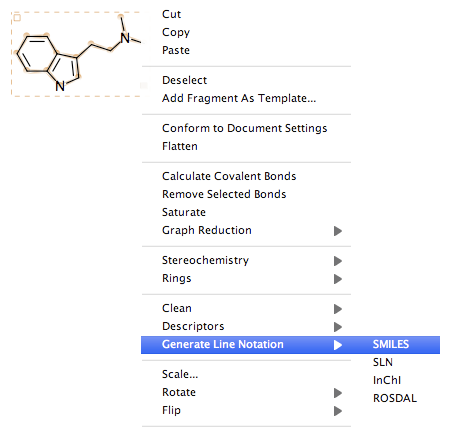
Table of Contents
Widgets
ChemDoodle also comes with a selection of Widgets, these are 11 small applications that provide extra functionality. These are Statistics – Displays document and drawing statistics, History – Provides full access to the undo/
redo queue, Symbols – Quick access to chemically relevant symbols and the full unicode range, Properties – Calculates molecular descriptors, Line Notation Pad – Generates and parses line notations, MolGrabber – Search databases for
chemical structures, Search – Search your computer and attached storage devices for chemical structures, Templates – Organizes chemical structure templates for your use, TLC Canvas – Draw thin layer chromatography plates, Multiplet Tool – Simulate multiplets, NMR SignalSeek – Simulate nuclear magnetic resonance. Many of these functionalities are also available as menu items.
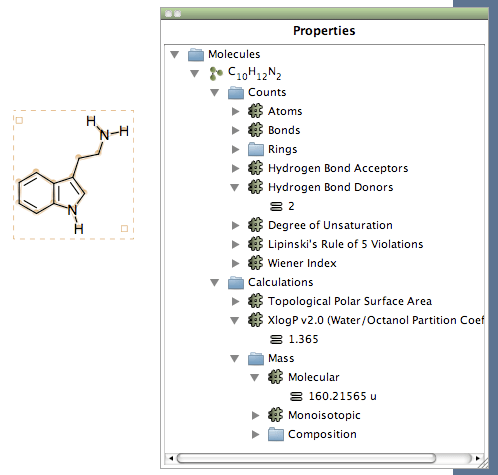
I’ve already mentioned the option to create a line notation, and the Templates and History widgets so I’ll concentrate on a couple of the others. The properties widget calculates a variety of molecular properties, this is a useful feature and I’m sure more descriptors will be available in the future. However it is a little tedious to click down the hierarchy to view the desired properties, especially if you modify a structure and want to see the impact because all the arrows close. This option is also available as a menu item, and this can be pasted into the document. However only the numeric value is copied not the label, so a logP of 2.2 gets copied as “2.2” not “LogP = 2.2”.
The Symbols widget gives access to various abbreviations e.g. Boc, TBDMS etc. but it is worth noting these are simple text elements and are not chemically intelligent and so are not accounted in the molecular properties.
Perhaps the two most interesting widgets are the MolGrabber and Search Widgets. MolGrabber is a web application for getting structures from online databases, currently MolGrabber only supports PubChem but it should be possible to add other datasources. Simply type in a query and within a couple of seconds the structure is displayed.
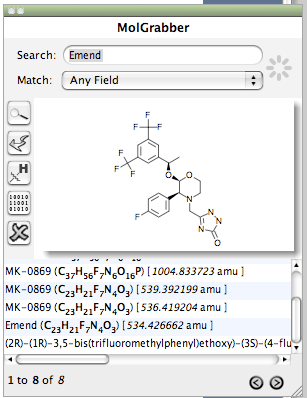
With a click you can download the associated data for the compound, this includes CID and a range of molecular properties. I don’t know if there is a published API but this could be a very tool is it is possible for the User or perhaps suppliers to add there own search engines.
The Search Widget is potentially very useful simply select a structure from the main ChemDoodle board onto the Search Widget button (not the widget window), select the root folder to search (to narrow the search) and click the search button.
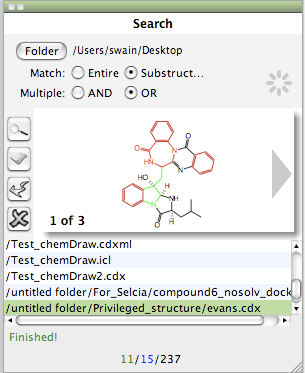
The results are displayed as a list, substructure hits are highlighted in red. If a file contains multiple structures, clicking the grey arrows that appear to the left and right of the structure will allow you to browse through them. The Search widget recognizes all formats that ChemDoodle understands, however display of 3D structures leaves a little to be desired. Also be careful if a folder contains a PDB file since this seems to slow searching significantly, in fact it might be nice to have an option to exclude them. In all these widgets The “Add to the Doodle Board” button (arrow) will place the current structure in the main structure panel onto the current document.
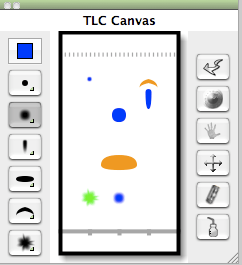
The tlc widget is great fum to play with and with a little trial and error it is possible to create very colourful plates! A variety of spot shapes are available and they can all be coloured and resized.
Copy and Paste and Round Trip Editing
As many of you are aware the recent update to Mac OS X 10.6 (Snow Leopard) has resulted in major problems for round trip editing, that is the ability to copy and paste structures into other applications such as word-processing or presentation applications, and then copy the enbedded image back into the chemical drawing package and still be able to edit them.
A little background, Apple pioneered interapplication communication and application scripting with an object-based messaging model that was far ahead of the corresponding Windows technology, and a third party developed a means to use AppleEvents to implement object embedding, called EGO. This allowed users of Microsoft Word version 5 for Macintosh to edit embedded ChemDraw drawings and create true compound documents. Unfortunately, Apple chose not to support this, and Microsoft rewrote Word 6 so that EGO could not be any longer supported by the third-party extension. As both Apple and Microsoft updated their applications and operating system the ability to retrieve the original chemical data in pictures pasted into documents has been lost. Specifically it was possible before Mac Vector Pict 2 was scrapped as the OS metadata and replaced by PDF.
More recently third-party solutions such as LinkBack have been implemented. LinkBack is an open source framework for Mac OS X that helps developers integrate content from other applications into their own. A user can paste content from any LinkBack-enabled application into another and reopen that content later for editing with just a double-click. Changes will automatically appear in the original document again when you save. However without Apple support this is unlikely to be widely adopted.
Currently ChemDoodle only supports round-trip editing to and from KeyNote at the present in my experiments it seems you can copy into Keynote and then into Pages, then back to Keynote and back into ChemDoodle and still retain an chemicaly editable structure. For all other applications it seems possible to paste structures and retain high quality images but you not then able to copy them back into ChemDoodle.
ChemDoodle Web components
In the past I have written a review of the ChemDoodle Web Components one of the minor drawbacks was creating the chemical content file format. With ChemDoodle that now becomes a trivial task. Select the molecule you want to display on the web page and then In the File menu, expand the Web Component submenu and press the “Generate Component” menu item.
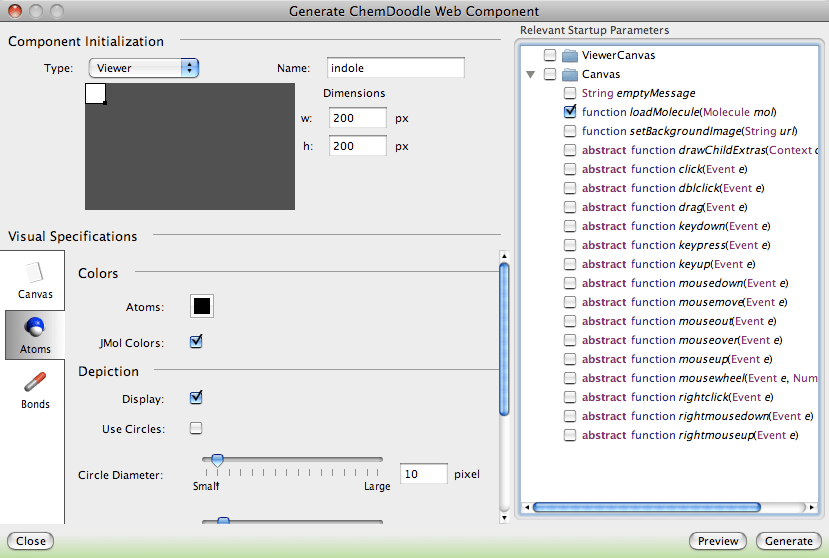
In the window that appear choose how you want the structure to display and behave, you can preview the image in your web browser. If you then click the “Generate button a window will appear containing all the code needed to paste into the web page.
Instructions for creating the page are included in the ChemDoodle Web Components Review.
Summary
I have to say I’m impressed with ChemDoodle, it come on a long way in a very short period of time. It provides all the basic functionality you could want in a desktop chemical drawing package, and once they have completed the work on adding round trip editing for other applications it will be pretty tough for anyone to better. The “Search” and “MolGrabber” widgets are brilliant ideas and I’m sure will become indispensable.

Stay connected